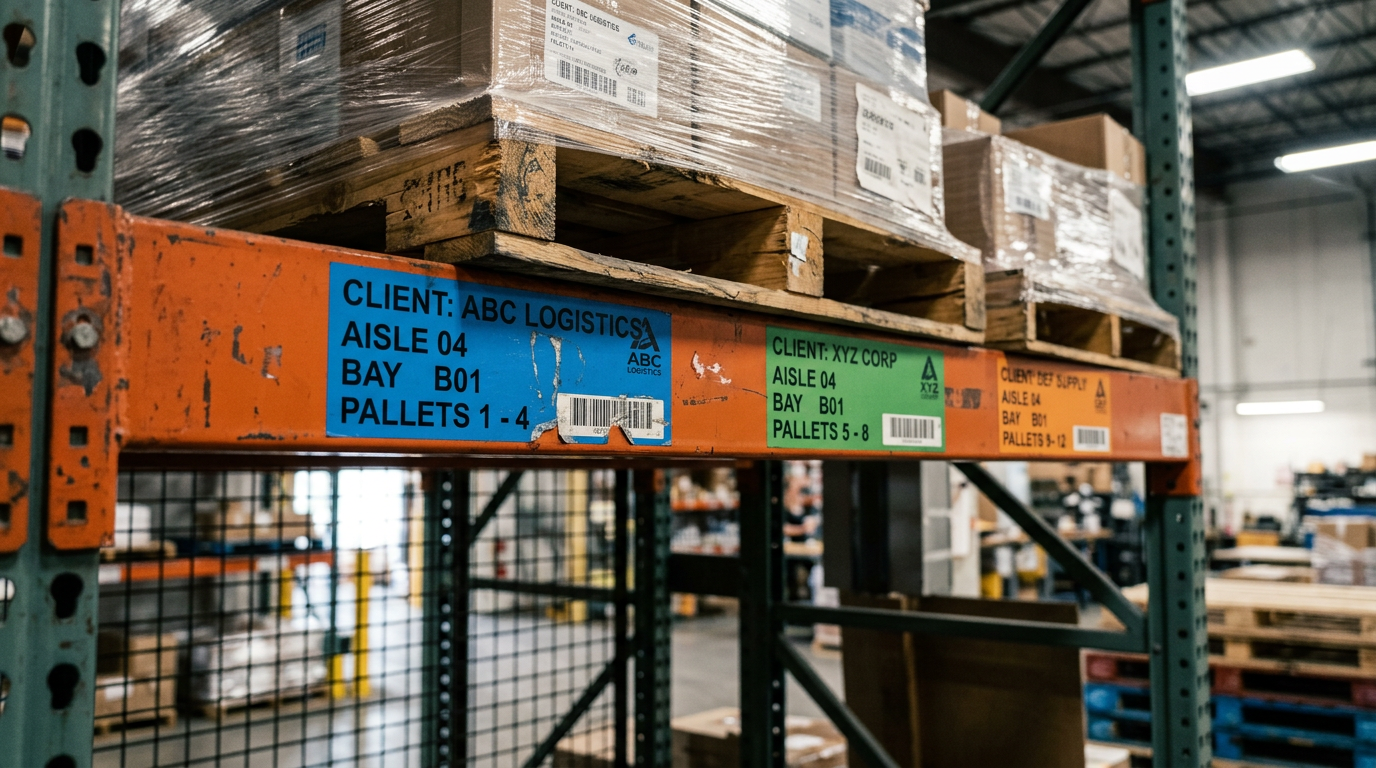
A small third-party logistics (3PL) warehouse is not a retailer with a stockroom. You hold other companies’ goods. You get paid for activity: pallets in, days in storage, picks, labels. Choosing a WMS for small business is therefore less about your size and more about your business model. Can the system tell your clients apart? Can it bill each one correctly? Can it prove you did the work?
This article sorts the must-have features from the nice-to-haves. It gives you the questions to ask any vendor before you sign. For a complete overview of pricing models and revenue capture, see the complete guide to 3PL billing.
Who this is for (and who it isn't)
A small 3PL needs a WMS that keeps each client's stock and orders separate, bills each client by its own rate card, and records billable work as it happens. If you store only your own products, you need an inventory or small-business WMS instead. This article is for warehouses that hold other companies’ goods.
If you store and ship for other companies
This article is for you if your warehouse holds inventory owned by multiple customer companies. You are a 3PL. Your revenue comes from the services you perform: receiving, storage, picking, packing, and dispatch. Your biggest financial risk is work that isn't captured and therefore isn't billed.
A WMS for small business built for 3PLs must treat your operation as a service provider. It needs to manage not just stock, but clients, contracts, and the billable events that generate your income. This is more than a reporting preference; it's a core business requirement. For example, the UAE's Federal Tax Authority requires taxable persons to keep records of goods and services supplied in sufficient detail for the Authority to identify the transactions, and these records must generally be kept for at least five years (Federal Tax Authority).
If you only store your own products
If you are a retailer, manufacturer, or e-commerce seller who only stores and ships your own inventory, this article is not for you. You need a standard inventory management system or a WMS designed for a single-owner stock pool. Those systems are excellent for managing your own stock levels, purchase orders, and sales channels, but they typically lack the multi-client and billing functions a 3PL depends on.
Why the difference is critical for a 3PL
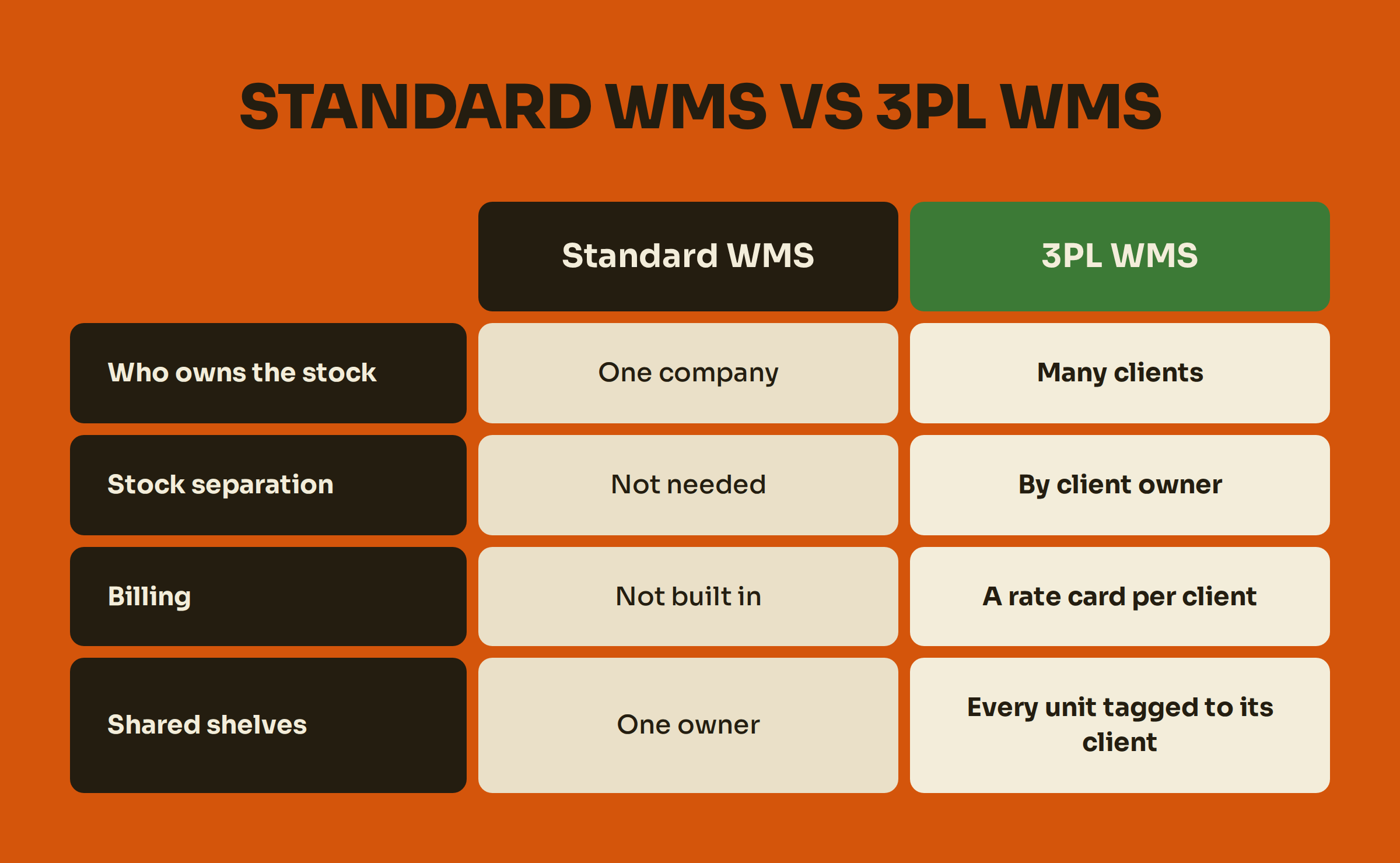
A standard WMS sees one warehouse with one owner. A 3pl software for small business sees one warehouse serving many owners. This distinction changes everything. Your system must be able to apply a different rate card to each client for the same activity. One client might pay per pallet for storage, while another pays per cubic metre. If your system can't handle this, you are forced to use spreadsheets and manual calculations at month-end, which is where unbilled work and invoice disputes begin.
The must-haves for a small 3PL
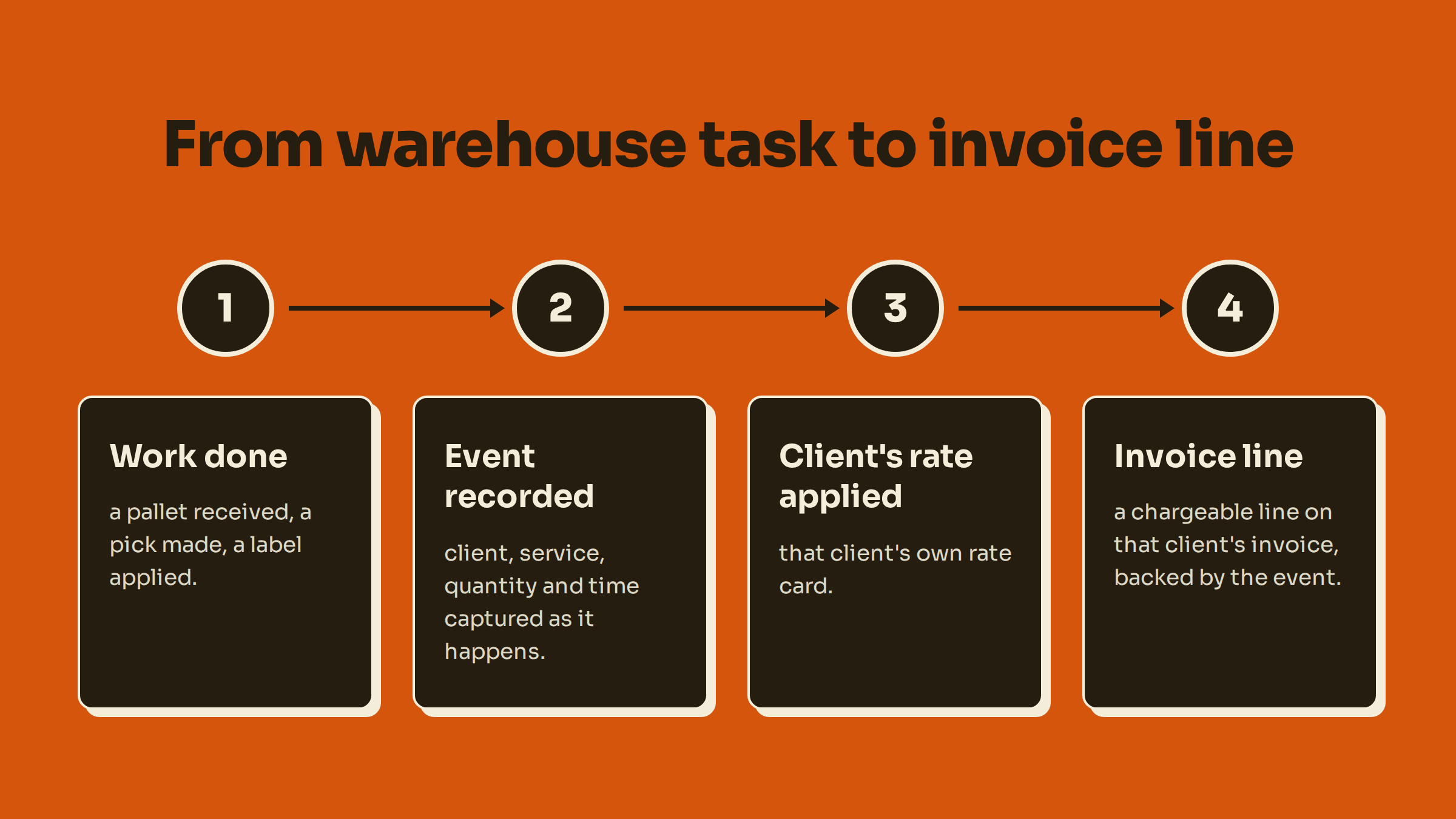
A small 3PL’s WMS doesn't need every enterprise feature. It does need an unbreakable, auditable chain from client to stock, to work done, to a chargeable event, to the final invoice line. These are the non-negotiable foundations.
Client Segregation: Separate ownership on a shared floor
Your most basic need is multi-client inventory management. Even if clients' pallets sit side-by-side on the same rack, your system must keep their stock, orders, and data completely separate. In practice, this means the WMS must enforce client ownership on every SKU, location, order, and stock movement. An operator should not be able to accidentally pick one client's stock for another client's order.
This isn't just good practice; in some regions, it's a compliance requirement. In India, for example, GST rules require warehouse operators to maintain records that identify goods owner-wise (Central Board of Indirect Taxes and Customs). Your client segregation software is a core operational control.
Receiving Discipline: A GRN for every inbound
Every pallet, carton, or item that enters your warehouse must be recorded on a Goods Received Note (GRN) or an equivalent receiving document. This is your control point. The GRN captures what arrived, when, from whom, and in what condition, creating an auditable record linked to the client and their purchase order. Solid receiving discipline is the first step in getting paid for all subsequent handling and storage.
This record is the foundation for both billing and compliance. In the UAE, for instance, the Federal Tax Authority requires records of supplies to be kept for at least five years after the tax period ends. A clear GRN provides the initial evidence for that supply chain record.
Per-Client Rate Cards: Bill the contract, not the warehouse
No two 3PL client contracts are identical. Your WMS must hold a separate, version-controlled rate card for each client. This is the heart of a warehouse billing system for a 3PL. The system must support charging for storage by the pallet, bin, or cubic volume, and for handling by the unit, carton, or order. It should also manage minimum monthly fees and special project rates.
Without a flexible 3PL rate management engine, you are forced to calculate invoices manually. According to UAE tax guidance, a tax invoice must generally be issued within 14 calendar days of the supply (Federal Tax Authority). Rebuilding charges at month-end makes this deadline harder to meet and increases the risk of errors.
Billable Event Capture: Get paid for the work you do
A 3PL gets paid for activity. But if the activity isn't recorded the moment it happens, it often goes unbilled. This is the single biggest source of revenue leakage for small warehouses. Your WMS must perform billable event tracking, creating a chargeable record every time your team receives a pallet, picks an item, applies a label, or performs any other service.
The alternative is rebuilding the invoice at month-end from paperwork and memory. This is where charges for ad-hoc work, returns processing, and small handling tasks get missed. An event-based system ensures every action that should be on the invoice is captured. Want to quantify the impact? Use our calculator to see what missed charges cost your operation.
Stock Accuracy You Can Prove
Your clients trust you with their inventory. You need to be able to prove your stock accuracy at any time. This means moving away from a single, disruptive annual stocktake towards a system that supports regular cycle counting. A good cycle count software for 3PL allows you to count small sections of the warehouse continuously, correcting discrepancies as you find them without shutting down operations.
This approach improves accuracy over time and gives you the data to answer any client query about their stock levels. To understand the operational benefits, see our comparison of cycle counts versus a stocktake.
What can wait until you are bigger
When you're choosing a WMS for small business, it's just as important to know what to skip. Buying features you don't need adds cost and complexity. Focus on getting paid correctly for the work you do today; add advanced optimisation when volume proves you need it.
Advanced Slotting and Labour-Optimisation
These modules use algorithms to calculate the most efficient place to store items and how to sequence tasks to minimise travel time. While useful for massive distribution centres, they are rarely the biggest bottleneck for a small, agile team. Start with simple rules—fast-movers near the front, clear location ownership—and only invest in advanced optimisation when you have hard data showing that travel time or labour allocation is a major constraint.
Heavy Automation Integrations
Conveyors, autonomous mobile robots (AMRs), and automated storage and retrieval systems (AS/RS) are powerful tools for high-volume operations. However, they are a significant capital investment and require stable, predictable processes to be effective. For a small 3PL, the first priority is process discipline. Accurate scanning, location control, and reliable billing will deliver a faster return than a robot working with bad data. Automation should solve a proven bottleneck, not be a solution in search of a problem.
Multi-Site Network Planning
If you operate from a single building, you do not need a WMS with complex multi-site inventory balancing and network planning features. These tools are designed to manage stock and orders across a national or international network of warehouses. Focus on mastering your small 3PL operations in one site first. A well-designed system will allow you to add more sites later without re-architecting your core processes.
EDI With Every Client From Day One
Electronic Data Interchange (EDI) automates the exchange of documents like purchase orders and shipping notices. While essential for serving large retail clients, it's not a day-one requirement for every customer. Prioritise the clients who contractually require it. For others, use simpler methods such as CSV uploads. A good WMS will allow you to add EDI connections as your clients' needs evolve, without forcing you to implement it for everyone at once.
Questions to ask any WMS vendor
Use your demo time to test the functions that determine whether you get paid. Don't get distracted by flashy dashboards. Ask these direct questions and demand to see the answers live in the software.
Can one warehouse hold several clients' stock with each client's data kept separate?
Ask the vendor to create two fictional clients and receive the same product for both. They must prove that when logged in as one client, you cannot see the other client's stock, orders, or activity. This segregation must be enforced at the database level, not just by hiding screens.
Can each client have its own rate card, including storage charged by pallet, by space, or by volume?
This is a critical test of any 3PL warehouse billing system. The vendor must demonstrate how to set up different storage billing rules for different clients. For example (illustrative rates), Client A pays $20 per pallet per month, while Client B pays $0.50 per square foot. Don't accept "we can do that with a custom report." The rule must be stored in the system as a native, versioned rate.
Is a billable event recorded at the moment the work is done, or rebuilt from reports at month-end?
Ask them to perform a single pick and pack. Show you the billable event record immediately after the task is completed. It should contain the client, service, quantity, timestamp, and the person who did the work. This proves the system is built for real-time storage billing automation and activity capture, not month-end reconstruction.
Can you show a client their stock and activity for any day, and back up every line on their invoice?
The system must be able to run an "as-of" inventory report for any date in the past. This is crucial for resolving disputes and justifying storage charges. Ask them to drill down from an invoice line item all the way back to the original operational transaction—the pick, the receipt, or the daily storage record. If they can't, the audit trail is broken.
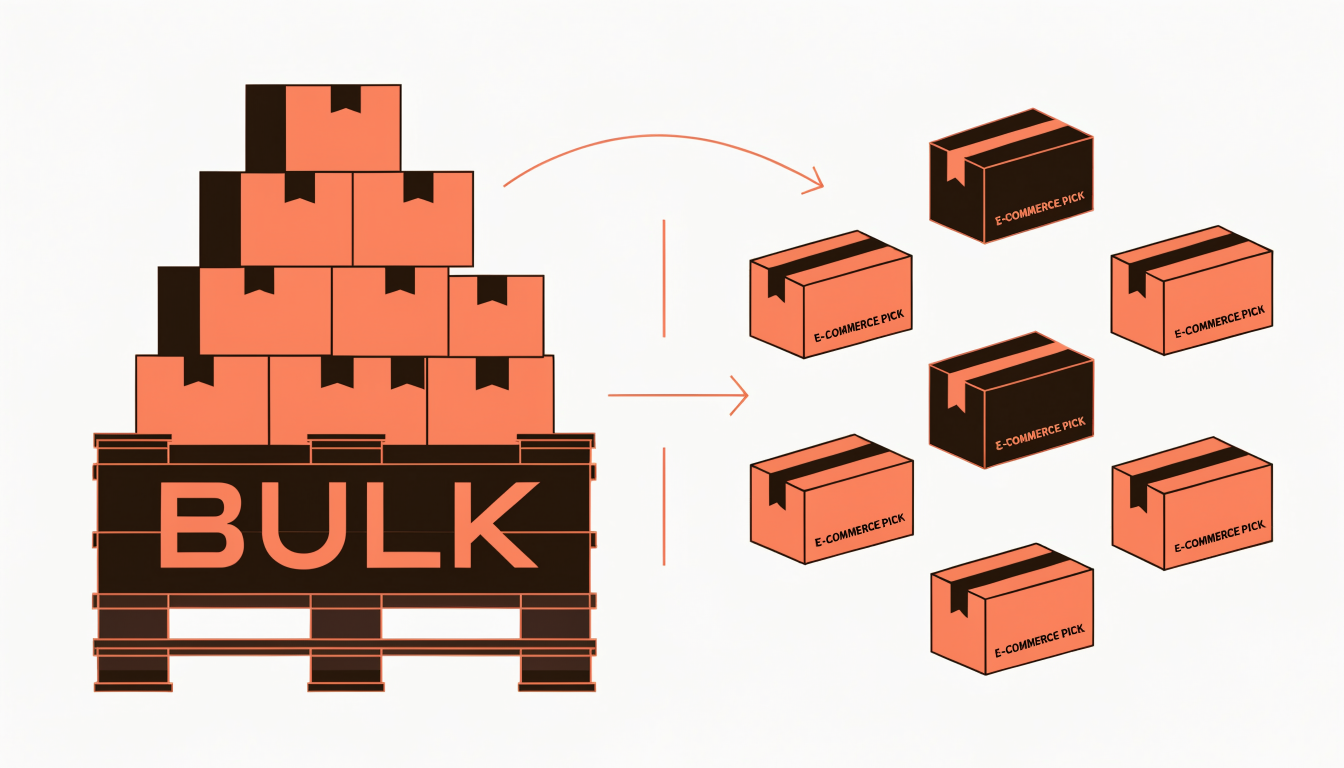
How are items and pallets handled when both sit on the same floor?
A 3PL often receives goods on pallets but picks them as individual items. The WMS must be able to manage this relationship. The vendor should demonstrate how the system tracks inventory at both the pallet (logistics unit) level and the item (e-commerce pick) level, and how it handles breaking down a pallet for picking.
Where Binsy fits
Binsy is the warehouse management and billing system built specifically for third-party, multi-client warehouses. It is designed to solve the core challenges of a small 3PL: getting paid accurately for all the work you do.
Binsy keeps your clients separate on a single floor, handles items and pallets side-by-side, and holds a unique rate card for each client. Crucially, Binsy writes a billing event as each move happens. So the month-end invoice is built from the work as it was recorded, receipt by receipt and pick by pick, rather than rebuilt from paperwork and memory.
This approach directly addresses the core difference between a standard WMS and one built for a 3PL. You can learn more about how a 3PL WMS differs from a standard WMS on our comparison page. Binsy, the FreighAI warehouse product, runs together with FreighAI today, providing a connected environment for your logistics operations.
We scope the first workflow, integration requirements and implementation plan with your team, in four stages: Discover, Design and configure, Validate, and Implement and expand.
Ready to stop leaving money on the table? See your floor in Binsy.
Frequently Asked Questions
Can a spreadsheet run a small 3PL?
For a very small operation with one or two simple clients, a spreadsheet can seem like a viable option. However, as you add clients, SKUs, and services, the risks multiply. Spreadsheets lack a robust audit trail, make client segregation difficult, and rely entirely on manual data entry for billing. This often leads to missed charges, invoice disputes, and countless hours spent on month-end reconciliation. You can see a detailed breakdown in our spreadsheet billing compared guide.
What is the difference between a 3PL WMS and a standard WMS?
The fundamental difference is that a 3PL WMS is built for a multi-client environment, while a standard WMS is built for a single-company inventory pool. A 3pl software for small business must have two core capabilities that standard systems lack: 1) The ability to segregate inventory, orders, and data by client owner within a single warehouse. 2) A built-in billing engine that can hold a unique rate card for each client and automatically generate charges based on warehouse activities. We explain this in detail in our article on how a 3PL WMS differs from a standard WMS.
Do I need a WMS if I only have two or three clients?
The number of clients is less important than your business model. If you bill those clients based on activity (e.g., per-pallet storage, per-pick handling fees), the business case for a WMS starts immediately. Even with just two clients, manually tracking every billable event is prone to error and revenue leakage. A proper WMS for small business captures that work as it happens, so the invoice reflects what was done.
What is a billable event in a 3PL warehouse?
A billable event is any specific warehouse activity performed on behalf of a client that corresponds to a line item on their contract. Common examples include receiving a pallet, putting away goods, storing a pallet for one day (a "pallet-day"), picking an order line, packing a carton, applying a special label, or processing a return. A WMS with billable event tracking creates a digital record of each of these actions the moment they occur, forming an auditable basis for invoicing.
How does a WMS handle multi-client inventory on the same shelf?
A multi-client WMS handles this by assigning an "owner" (the client) to every single unit of stock. When goods are received, they are assigned to a specific client account. Even if Client A's product is on the same shelf as Client B's, the system knows exactly which units belong to whom. This ownership tag follows the stock through every movement, pick, and count, preventing cross-client allocation and ensuring data integrity.
Sources & References
This article draws on research and data from the following verified sources:
From reading to the rack.
Bring one client's rate card and one month of invoices. We'll walk your flow through Binsy and show where the billing events would have written themselves.
Book a walkthrough